
Curated blog with news, events, listings, jobs and exciting stories about web design & web development.

ThriveDesk: New Snooze Support Ticket Feature
Parvez from ThriveDesk has just announced a new feature that allows users to snooze tickets on the customer support platform. It even comes with natural language scheduling.
New Snooze Option
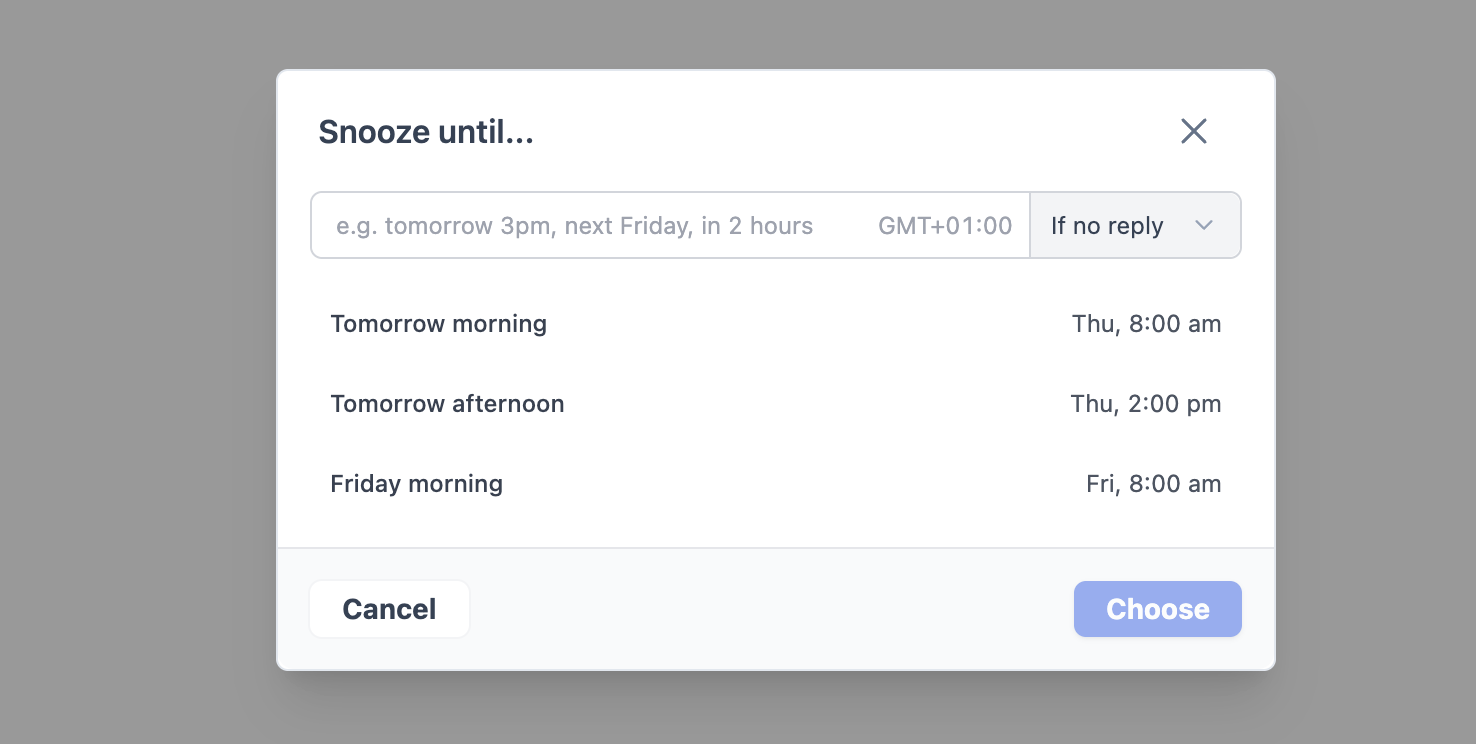
Some support tickets don’t require an immediate response — they need to be handled at the right moment. With the new Snooze feature, you can schedule when to revisit a ticket.
Check out the features:
- Natural language scheduling: Simply type ‘tomorrow at 9 am’ or ‘next Friday’ and ThriveDesk will figure it out.
- Two conditions: If there is no reply, the snooze is cleared automatically. It will still be brought back on your schedule regardless.
- Later folder: All snoozed tickets are stored here, out of your active inbox but never lost.
- Visual indicators: A yellow clock icon clearly indicates which conversations have been snoozed.
- Edit or cancel anytime: Reschedule or unsnooze in one click before it goes off.
Select a time, and the ticket is temporarily removed from your active inbox. When it’s due, it automatically returns to the top — ready for your attention.
Sound interesting? Take ThriveDesk for a spin today!

Biff Codes - The Job Board for WordPress Devs
Biff.codes is on a mission to revolutionize job boards. Post and find WordPress developer jobs for free.
FTC Disclosure: We may receive a payment in connection with purchases of products or services featured in this post.




Add your first comment to this post