
Curated blog with news, events, listings, jobs and exciting stories about web design & web development.


WP Umbrella Rebuilds Logs Page
Aurelio from WP Umbrella has just introduced a rebuilt Logs page to its WordPress management and maintenance platform. It provides a single timeline for each site, including every backup, update and sync, as well as information on who triggered it and why it failed.
Better Logs
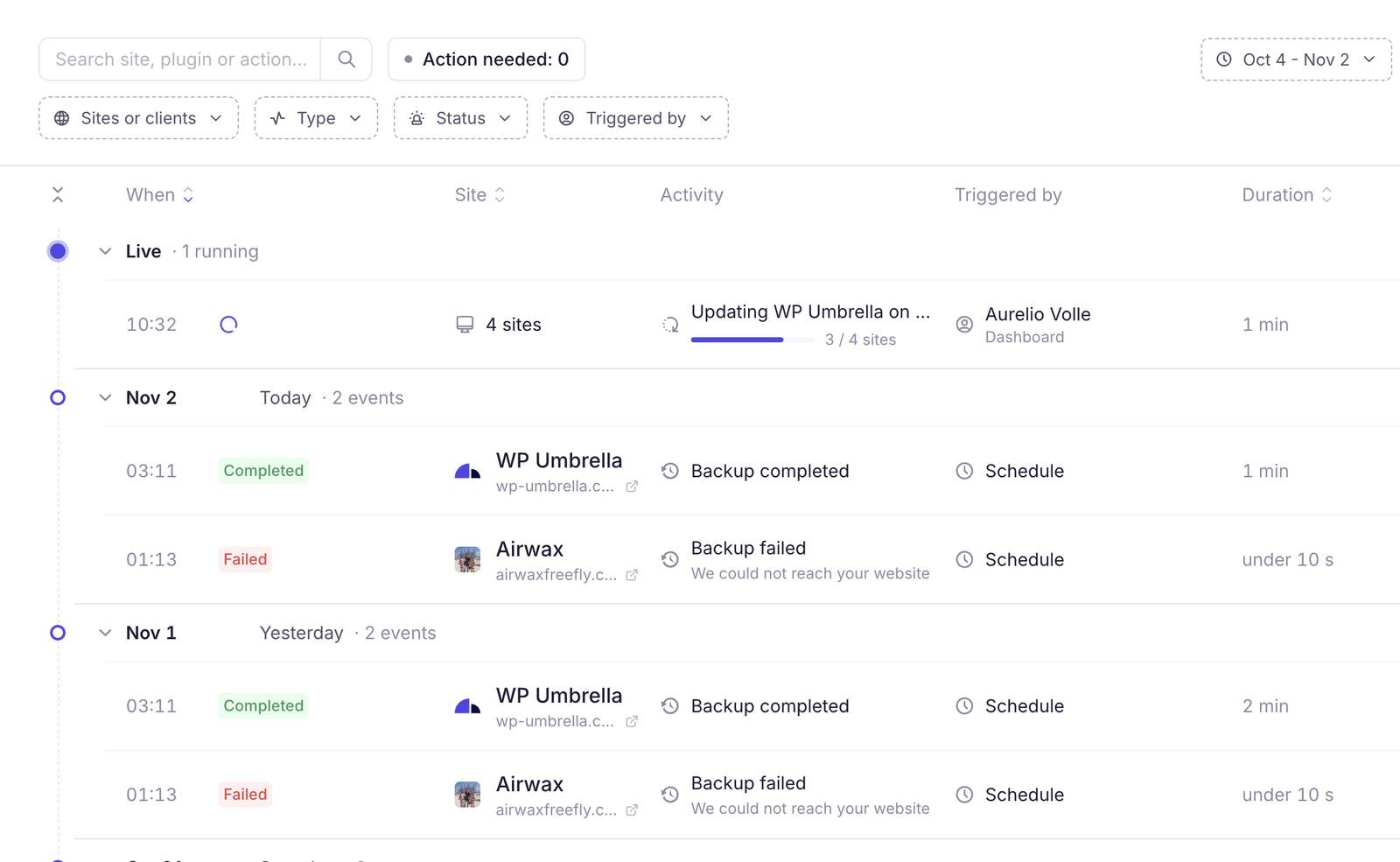
A WP Umbrella account automates many processes that you would never start manually: nightly backups on every site, scheduled updates, syncs, cache clears and the bulk run that a teammate launched before lunch. It’s impossible to keep track of all of these processes on a site-by-site basis.
But not anymore. The rebuilt Logs page provides a single timeline for all the processes running on your account, grouped by day and across every site. Here’s what you’ll find:
- Every process (backup, update, cache clear or sync), along with the time it took, the result and how long it took.
- You can also see who or what triggered it: a schedule, a teammate, someone directly in wp-admin or your AI assistant through the WP Umbrella MCP.
- There is also an ‘Action needed’ counter at the top so you can see at a glance whether anything is waiting for you.
- You can search by site, plugin or action, filter by client, type, status or trigger, and pick any date range.
- Running operations are live and pinned at the top with a progress bar. Open one and watch each site move from ‘running’ to ‘completed’ or ‘failed’.
- The failure explanations are clear. When something fails, the page explains in plain language what has happened and what to do about it, and provides a link to the relevant help article.
The Logs page is also useful for MCP. The more you let your assistant run updates and backups for you, the more you need a central location showing what was done and whether it was successful. This is that location in WP Umbrella.

Biff Codes - The Job Board for WordPress Devs
Biff.codes is on a mission to revolutionize job boards. Post and find WordPress developer jobs for free.
FTC Disclosure: We may receive a payment in connection with purchases of products or services featured in this post.








Add your first comment to this post